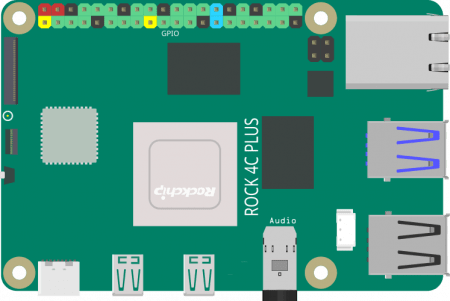
RADXA ROCK Pi 4C Plus ():
- This SBC has pretty hot specs;
- Rockchip hexacore RK3399 ARM processor
- GPU Mali T860MP4, Memory 64bit dual channel LPDDR4@3200Mb/s, 1GB/2GB/4GB
- Installed Debian Linux;
- Only Debian desktop, Android and Ubuntu headless offered on Radxa site
- Lean install without heaps of software like Rasberian \ RasPi OS out of the box, however it runs a browser and installer so owners can find and install packages to their taste
- Ubuntu only offered as headless server, not of interest to me
- Android looks cool and different but so far I haven’t experimented with it much. With it’s background in phones and tablets (i.e. mobile and touchscreen) I haven’t invested time in getting around the Android-desktop paradigm. Definitely a to-do!
** 07-07-23 Debian 10 is installed (Debian 11 is available on Radxa website for download), configured and is awesome. Installed Lazarus using whatever stock Debian package installer command was on Lazarus page
** Lazarus needs some finessing with some fppkg file or something. Can build using ‘compile without debugger’
** Added a couple of TopRHS panel icons, sensor for CPU temp, WiFi strength
** Wifi probably wasn’t working out of the box, there are terminal scripts on the Radxa 4c+ Debian download page, typed those, then used browser, worked fine, then added icon to Top RHS
** note to add Thonny and test 4C+ as dev and GPIO experimenter board
** rock rock uname and password
RADXA Zero D4E128:
- Loaded Twister OS – Chris on explaining computers is running Twister OS on his and Twister is awesome with the emulation of every OS
- from RADXA website – Linux can boot from micro SD or eMMC module. Android can only be installed on eMMC.
** 07-07-23 running Twister \ Armbian. Didn’t work well on 12 inch OrangePi screen in 1080P, plugged into my oldest monitor (from the early 2000’s) , 1280*760 default wasn’t ideal, changed to 1024*768 which is excellent, used the screen res by following config or settings or similar until found a change screen dims setting
** cannot find password for default username Pi, tried rock, 1234, asdasd, and more. Still a mystery….
Raspberry Pi 4B: 4GB probs, I bought the best on offer in 2021.
- keep using default Ras Pi OS, ex Rasberrian, as it is awesome and stable and OEM
** first SBC I have interfaced with GPIO pins and Thonny Python
** rasberrypi or pi uname & password
Raspberry Pi Zero W:
- check if I have series 1 or 2 … both are still sold in paralell
Original Collector:
- The first-generation Raspberry Pi Model B was released in February 2012, followed by the simpler and cheaper Model A
Banana Pi M2 Zero:
- Armbian 22-10 Bullseye (Ubuntu) via Balena etcher- not entirely successful – screen was outside my actual monitor and hard to view
- eventually logged in \ muddled through root and new uname & PWD.
- won’t boot to desktop GUI, just sits at $ prompt
- older tech – has 2 micro USB vs USB \ USB-c + mini HDMI
** bought adapter from Jaycar 15-07-23 for USBc to USBa – to enable use of USBCto2*USBA hub – using a micro to A lead I have (phew!)
** to enable using my mech keyboard and official RasPi or OrangePi mice - Ubuntu Mate 16-04:
- Works pretty well on OrangePi 12.1 inch screen. Screen does have a habit of going blank for a second after certain screen inputs and refreshes which is annoying but not genuinely detrimental
- ** burned Ubuntu Mate 16-04 desktop on 15-07-23 with Balena etcher onto Sandisk Pro 64GB
** user/pass: root/bananapi, pi/bananapi - Had significant issue after using the installer for 1) sudo update upgrade 2) Libre office install 3) Thonny install – profile disk volume full. Seems crazy noting the Sandisk is 64GB and was largely empty, however the OS had clearly defined a small partition – required reinstall of OS to resolve – ** df – h showed /dev/mmcblk0p2, i.e. root folder, was full
- “How to add space to root partition in Linux” has plenty of sites via google search
- Have to reset time via >System>Administration>Time and Date not via right click top RHS panel apps
Orange Pi 800 + FlatScreen 8in:
- Enlosed in keyboard system runs default OrangePi OS which is based on Arch Linux
** 07-07-23 have used Debian package install commands for Thonny, worked fine, (sudo apt install Thonny or close to that)
** came with power and cables, runs happily on RasPi4 power pack
** orangepi orangepi uname and password
Orange Pi zero 2 plus small form factor:
- ??
Mango Pi MQ-Pro 1GB RiskV (D1 Allwinner)(Zero):
- Tina-Linux/Debian – but website says don’t use Tina, use Armbian, probably negative user feedback pushed change
- https://bret.dk/armbian-on-the-mangopi-mq-pro/
- explaining computers – Armbian xfce (ubuntu base)
- far right USBC is OTG & pwr
** I used Armbian 22.04 Jammy and ran update and upgrade
** chose uname and password first time,
** has snap
** dillo browser may be too light
Lichee Pi 4A RiskV:
- ordered 15-07-23 with 8GB&32GB specs + 12v pwr supply chines prongs $230
- pretty exciting RiscV SBC which out competes RasPi 4B despite being RISC
MicroSD Cards
https://www.tomshardware.com/best-picks/raspberry-pi-microsd-cards
32GB is what was tested, what I have bought historically, good size for builds in 2023
Sandisk Extreme Pro gets the nod for speed
on 18-06-23 the XP64GB is on special at Officeworks for $24 vs. $21 ultra and $28 extreme & 32GB is $15Ultra, $21Extreme, NA XP
Balener etcher for writing images to microSD
- not readable in Windows, cards \ volumes show as unformatted

 Single Board & MCU
Leave a comment